
Freeter
A productivity tool that consolidates apps, files, and tasks into organized workflows for seamless project management across Linux, Windows, and macOS.


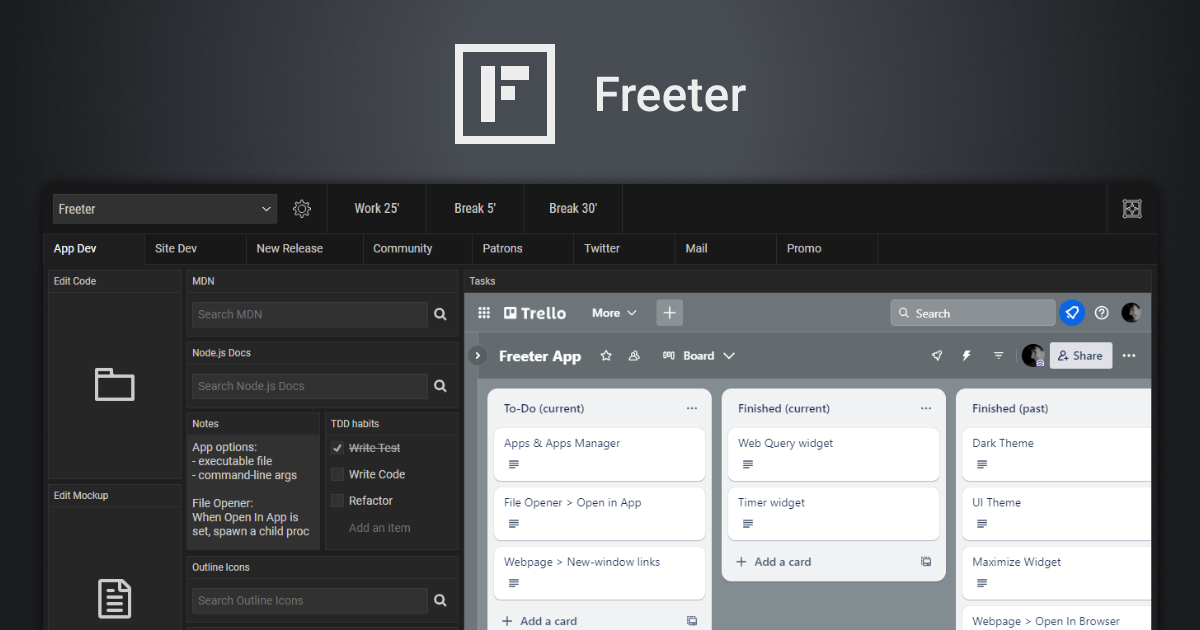
Freeter
Freeter is a desktop productivity tool designed to help users organize their workflows, projects, and tasks in one place. By consolidating apps, files, and resources into customizable workflows, Freeter enables users to switch between projects effortlessly and stay focused on what matters.
Key Features
- Project & Workflow Organization: Group tasks, apps, and files by projects or workflows for better focus and productivity.
- Widget System: Add widgets for quick access to web apps, file openers, to-do lists, timers, notes, and more.
- Webpage Widget: Embed and manage web apps directly within Freeter, supporting multiple accounts per project.
- File Opener Widget: Open project files in preferred editors with a single click.
- Web Query Widget: Perform templated searches using search engines or other websites.
- Commander Widget: Execute frequently used terminal commands with a click.
- Timer Widget: Use Pomodoro-style timers to break work into focused intervals.
- Workflow Tabs: Split complex projects into multiple workflows for better organization.
- Shelf: Keep essential tools like timers accessible across all workflows.
- Dark Theme: Switch between light and dark themes for a personalized experience.
- Privacy-First: No telemetry, tracking, or data collection—fully open-source under GNU GPL.
- Cross-Platform: Available for Linux, Windows, and macOS.
- Hotkey Access: Quickly open Freeter using Ctrl or ⌘+Shift+F.
Tech / Self-Hosting
Freeter is a self-hosted desktop application built with Electron and released under the GNU GPL license. It does not require a server or cloud backend, making it ideal for users who prioritize privacy and offline functionality. The app can be downloaded and installed directly on your system without any external dependencies.
GitHub Repository: freeterapp/freeter
System Requirements:
- Linux, Windows, or macOS
- Electron-compatible runtime
Installation:
- Download from freeter.io/download
- Run the installer or portable executable for your OS.