5 Best Open Source LucidChart Alternatives
A curated collection of the 5 best open source and self-hosted alternatives to LucidChart in 2026.
Looking for a free, privacy-friendly, or self-hosted replacement for LucidChart in 2026? The top open-source alternative is Excalidraw — Virtual whiteboard for sketching diagrams, flowcharts, and wireframes with a distinctive hand-drawn look. Real-time collaboration built in..
Other highly rated open-source LucidChart alternatives include Mermaid, Tldraw and drawDB.
Virtual whiteboard for sketching diagrams, flowcharts, and wireframes with a distinctive hand-drawn look. Real-time collaboration built in.
Virtual whiteboard for sketching diagrams, flowcharts, and wireframes with a distinctive hand-drawn look. Real-time collaboration built in.

Open-source diagramming and charting tool

Mermaid is an open-source diagramming and charting tool that allows you to create diagrams and visualizations using text and code. It is widely used for documentation, presentations, and collaborative projects. - Text-based diagramming: Define diagrams using simple, human-readable text syntax - Live editor: Real-time preview and editing of diagrams - Multiple diagram types: Supports flowcharts, sequence diagrams, Gantt charts, class diagrams, and more - Integration-friendly: Works with popular platforms like GitHub, GitLab, VS Code, and Notion - Collaborative features: Team-based diagram creation and sharing - Extensible: Customizable themes and plugins available - Award-winning: Winner of the 2019 JavaScript Open Source Award - Self-hostable: Can be deployed on your own infrastructure Mermaid is open-source software that can be self-hosted. The project is available on GitHub and provides documentation for deployment options. The core library is JavaScript-based and can be integrated into various applications and platforms.

Free instant collaborative whiteboard for all devices
tldraw is a free, instant virtual whiteboarding tool designed for seamless online collaboration without requiring user signups. Built to work across all devices—mobile, tablets, and desktops—it provides a simple yet powerful canvas for brainstorming, planning, and visual collaboration. - Instant Collaboration: Real-time multi-user editing with no signup required. - Cross-Platform Support: Fully functional on mobile, tablet, and desktop devices. - No Installation Needed: Access directly from your browser with zero setup. - Simple & Intuitive: Clean, user-friendly interface for quick adoption. - SDK for Developers: Build custom whiteboard experiences with the tldraw SDK. - Privacy-First: No forced account creation or tracking by default. tldraw is primarily a web-based SaaS application, but developers can leverage the tldraw SDK to build custom whiteboard solutions. The SDK enables self-hosting and integration into existing applications. The core library is open source under the MIT license, allowing for extensive customization and deployment flexibility.

Visual database schema editor and SQL generator
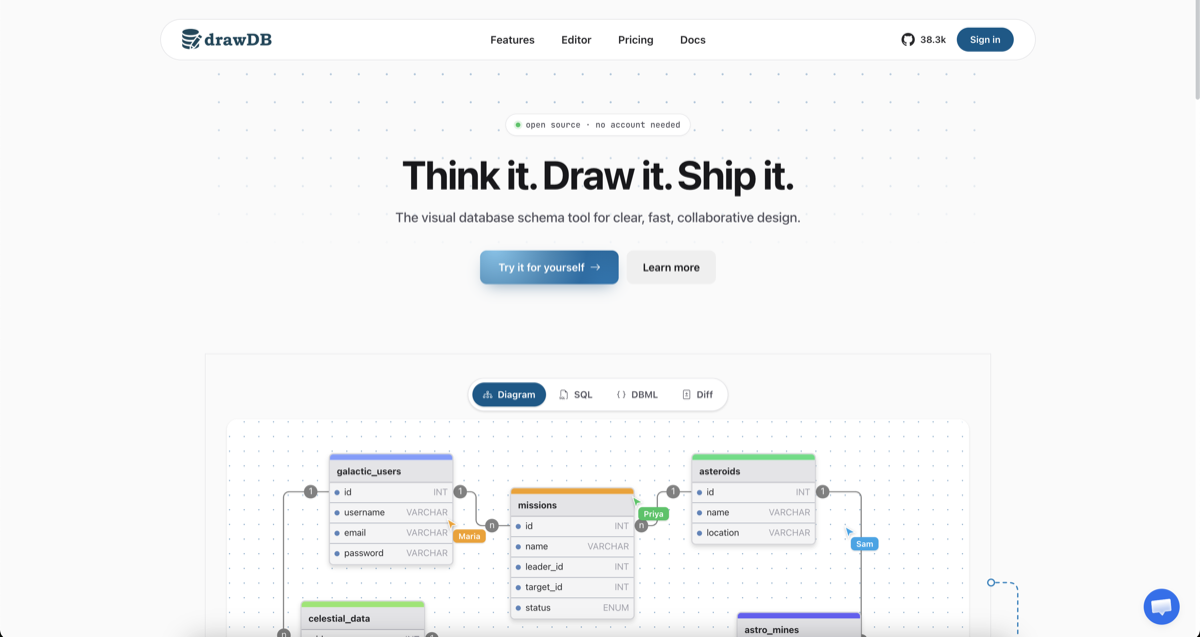
drawDB is a free online database schema design tool that simplifies database modeling and SQL generation. Whether you're designing a new database or reverse-engineering an existing one, drawDB provides a visual interface to create, edit, and export schemas with ease. - Visual Schema Design: Drag-and-drop interface to create and customize database diagrams with tables, relationships, and notes. - Multi-Dialect SQL Generation: Export clean DDL for PostgreSQL, MySQL, SQLite, MariaDB, SQL Server, Oracle, and more. - Real-Time Collaboration: Work together with your team in real time, with shared cursors and instant sync. - AI Schema Assistant: Describe your requirements and let AI draft tables, relationships, and types for you. - Reverse Engineering: Import existing DDL scripts to automatically rebuild your database diagram. - Cloud & Local Storage: Save diagrams to the cloud (Pro) or locally in your browser (free). - Export Options: Generate SQL scripts, save diagrams as JSON or images, and create migration scripts. - Customizable Workspace: Tailor the UI to fit your workflow with keyboard shortcuts, templates, and an infinite canvas. - Self-Hosting: Fully open-source with Docker support for running drawDB on your own infrastructure. - Issue Detection: Catch errors in your diagram to ensure generated SQL scripts are always correct. - Presentation Mode: Present your diagrams during team meetings and design reviews. drawDB is built with modern web technologies and can be self-hosted using Docker. The project is fully open-source, allowing you to customize and deploy it behind your own firewall for enhanced privacy and control. Self-Hosting Steps: bash git clone https://github.com/drawdb-io/drawdb cd drawdb docker compose up -d

Free open-source diagramming tool for teams

draw.io is a free, open-source diagramming application trusted by 100M+ users worldwide. Store your data wherever you want—we can't access it. - Privacy First: Store diagrams locally or in your preferred cloud (Google Drive, OneDrive, etc.). We never access your data. - Real-time Collaboration: Work together with shared cursors and seamless teamwork. - Backwards Compatible: Diagram files created in 2005 load in today's app—no obsolescence. - Cross-Platform: Native integrations with Google Drive, Microsoft 365, Atlassian, GitHub, VS Code, and Notion. - Embed Anywhere: Embed interactive diagrams in docs, wikis, or applications. Export to SVG, PNG, PDF, or keep editable. - No Sign-Up Required: Start diagramming instantly without accounts or credit cards. - Open Source: Apache 2.0 licensed with no artificial scarcity or enterprise tiers. - Independent: Privately held, VC-free, focused on great software over valuation growth. - Self-Hosted Options: Deploy draw.io on your own infrastructure using the open-source codebase. - Desktop App: Available for Windows, macOS, and Linux for offline diagramming. - Embeddable: Integrate diagrams into your applications via iframe or API. - Developer-Friendly: Extensive documentation and SDKs for custom integrations. View all integrations | GitHub Repository
About LucidChart
Lucidchart is a cloud-based intelligent diagramming tool that combines AI, data integration, and automation to help teams create, collaborate on, and optimize visual documentation.
Key Features of LucidChart
- AI-Powered Diagramming: Generate diagrams automatically from prompts or data imports using Lucid AI, with features like prompt enhancement and summarization.
- Real-Time Collaboration: Work simultaneously with team members on diagrams, flowcharts, and technical drawings.
- Process Mapping: Create and optimize process maps, flowcharts, and organizational charts with diagram-as-code support.
- Technical Diagramming: Build system architecture diagrams, network topologies, and infrastructure visualizations.
- Data Integration: Import data from tools like Jira, Notion, Salesforce, and Microsoft Copilot to auto-generate visuals.
- Intelligent Insights: Use AI to analyze diagrams, identify bottlenecks, and generate actionable recommendations.
- Enterprise Security: Features like Enterprise Shield provide enhanced security and granular access control.
- Cross-Platform Use Cases: Supports process documentation, team planning, education, and technical system design.
Tech / Self-Hosting
Lucidchart is a cloud-based SaaS platform with no self-hosting option. It offers enterprise-grade security, GDPR compliance, and integrates with major cloud providers and AI tools. The platform provides APIs and developer tools for custom integrations.