9 Best Open Source Terminal Alternatives
A curated collection of the 9 best open source and self-hosted alternatives to Terminal in 2026.
Looking for a free, privacy-friendly, or self-hosted replacement for Terminal in 2026? The top open-source alternative is Warp — Modern AI-powered terminal for agentic coding.
Other highly rated open-source Terminal alternatives include Ghostty, Alacritty and Zellij.

Modern AI-powered terminal for agentic coding

Warp Terminal is a modern, AI-powered terminal reimagined for developers building with agents. It combines intuitive block-based editing, intelligent autocomplete, and native agent orchestration to transform how you interact with your command line. - Block-based editing: Write and edit commands in structured blocks for clarity and reusability - AI-powered autocomplete: Get intelligent command suggestions and completions - Native agent orchestration: Seamlessly integrate and manage coding agents like Claude Code, Codex, and OpenCode - Modern UI: Clean, intuitive interface with themes and customization options - Collaboration features: Shareable command blocks and workflows - Cross-platform support: Works on macOS, Windows, and Linux - Security: Built-in protections for sensitive operations and data - Extensible: Plugin system for adding custom functionality Warp Terminal is a proprietary desktop application available for macOS, Windows, and Linux. While it doesn't require self-hosting, it integrates with various cloud-based AI services and local agent runtimes. The application is developed by Warp Inc., a US-based company with enterprise-grade security and compliance features. For developers interested in building custom agent workflows, Warp provides Agent Kits and open APIs for integration with other tools and services.
Experience blazing-fast terminal performance with GPU acceleration and platform-native UI. Cross-platform compatibility meets modern design.
Experience blazing-fast terminal performance with GPU acceleration and platform-native UI. Cross-platform compatibility meets modern design.

Fast, cross-platform terminal emulator with OpenGL
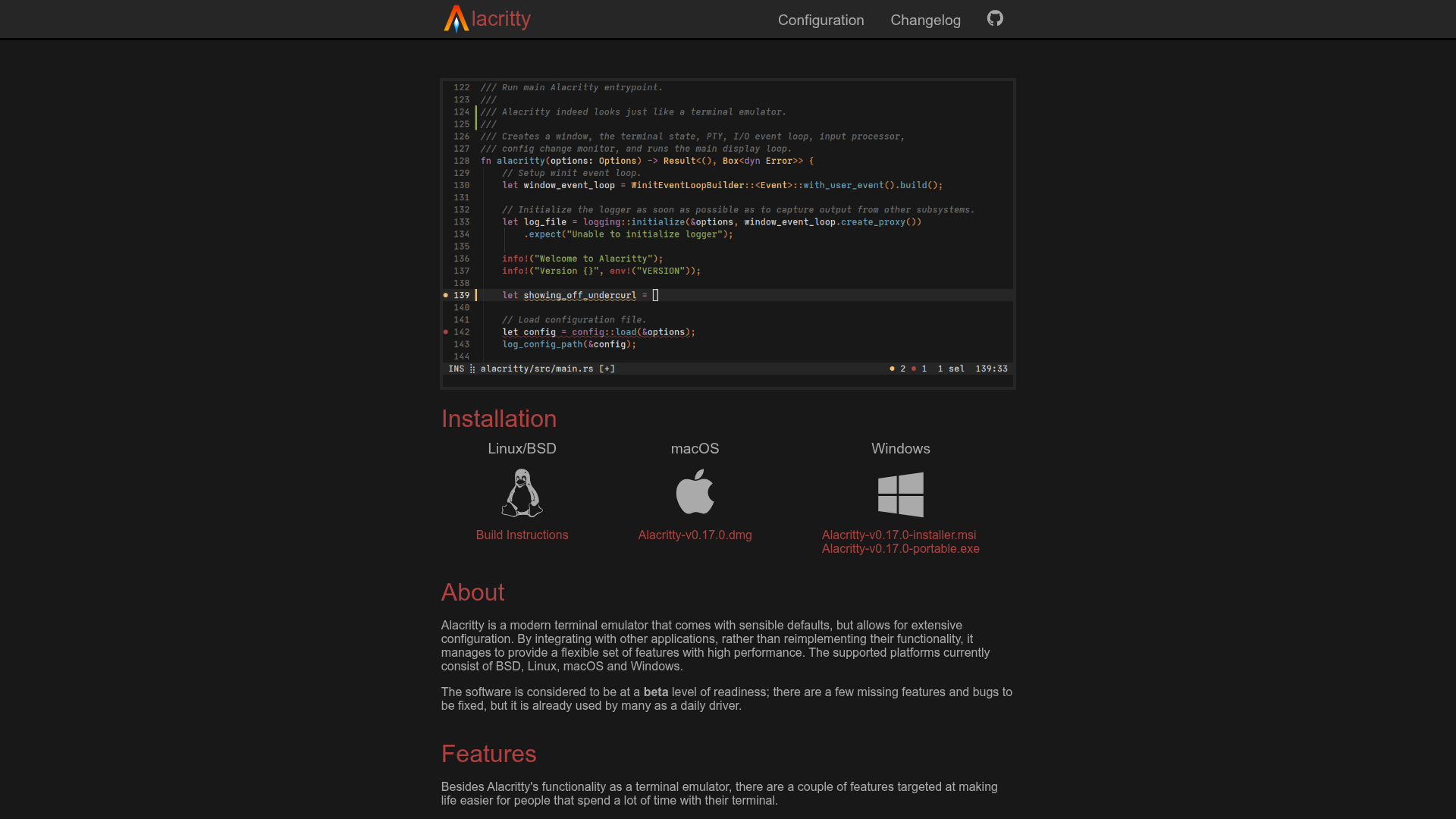
Alacritty is a blazing-fast terminal emulator that prioritizes performance and simplicity. Built with OpenGL for hardware-accelerated rendering, it offers a clean, configurable interface while integrating seamlessly with other tools rather than reimplementing their functionality. - Vi Mode: Navigate and select text using familiar vi keybindings - Search: Quickly find text within scrollback buffers - Regex Hints: Mark text for mouse or keyboard interaction - Multi-Window: Single process for improved resource efficiency - Cross-Platform: Native support for BSD, Linux, macOS, and Windows - GPU Acceleration: Hardware-accelerated rendering via OpenGL - Extensive Configuration: Highly customizable through YAML config files - Sensible Defaults: Ready-to-use out of the box with minimal setup Alacritty is a standalone desktop application that runs locally on your machine. It requires no server components or internet connection to function. The software is open source (Apache 2.0 licensed) and can be self-hosted by compiling from source or using pre-built binaries available for all supported platforms.

Terminal workspace with floating panes and layouts
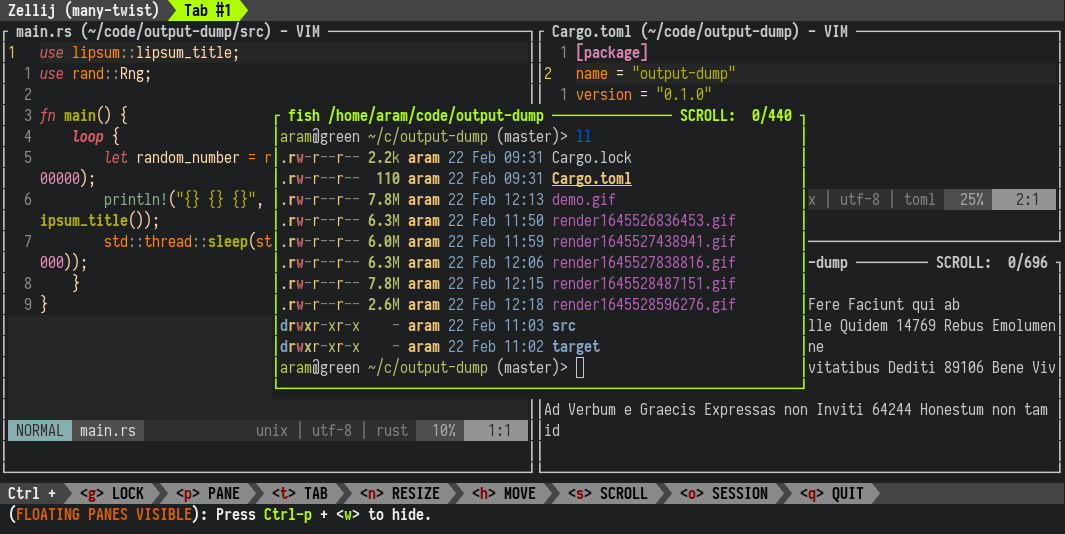
A terminal workspace that doesn't sacrifice simplicity for power. Zellij provides floating panes, customizable layouts, multiplayer collaboration, plugins, and works directly in your browser. Whether you're managing complex workflows or collaborating with a team, Zellij enhances productivity without overwhelming complexity. - Floating Panes: Arrange terminal panes freely for optimal workspace organization - Custom Layouts: Save and restore layouts for different workflows or projects - Multiplayer Collaboration: Share terminal sessions with team members in real-time - Plugin System: Extend functionality with community-built plugins - Browser Support: Run Zellij directly in your browser without installation - Cross-Platform: Native support for Linux, macOS, and Windows - Session Management: Persistent sessions that survive terminal restarts - Keybindings: Customizable keyboard shortcuts for efficient navigation Zellij is a self-hosted terminal workspace that runs entirely on your local machine or server. The software is open source (MIT license) and can be installed via package managers or direct downloads. For teams, Zellij offers a paid hosted session sharing service (currently in beta) at zellij.dev/zellij-online. Installation options: - Linux: Package managers (apt, dnf, pacman) or direct download - macOS: Homebrew or direct download - Windows: Direct download or WSL support - Browser: One-click launch via zellij.dev/launch System Requirements: - Modern terminal emulator (e.g., iTerm2, Alacritty, Windows Terminal) - Rust toolchain (for custom builds) - WebAssembly support (for browser version)
GPU-accelerated terminal emulator for power users
kitty is a modern, GPU-accelerated terminal emulator designed for developers and power users who live in the terminal. Built with performance in mind, it utilizes GPU rendering and SIMD vector CPU instructions to deliver best-in-class speed and responsiveness. - GPU Acceleration: Uses GPU rendering for smooth performance even with complex terminal applications - SIMD Optimization: Leverages CPU vector instructions for enhanced processing speed - Highly Customizable: Extensive configuration options via kitty.conf for fonts, colors, layouts, and keyboard shortcuts - Tab & Window Management: Advanced tabbing and window splitting with intuitive keyboard controls - Wide Color Support: Full support for wide gamut color formats including OKLCH and CIE LAB - Cross-Platform: Available on Linux, macOS, and BSD systems - Extensible: Supports plugins and custom actions for enhanced functionality - Performance Tuning: Configurable performance settings for optimal resource usage kitty is a standalone desktop application that runs locally on your machine. It requires no server infrastructure or external dependencies beyond standard system libraries. The application is open source and can be built from source on most Unix-like systems. Configuration is stored locally in plain text files, making it easy to version control and customize.

Cross-platform terminal emulator with advanced features
WezTerm is a powerful, cross-platform terminal emulator designed for developers who need a fast, customizable, and feature-rich command-line experience. - GPU-accelerated rendering for smooth scrolling and high performance - Cross-platform support for Windows, macOS, Linux, FreeBSD, and NetBSD - Multiplexing with tabs, panes, and workspaces - Lua scripting for advanced configuration and plugin support - Hyperlinks in terminal output - Shell integration for enhanced command-line workflows - Quick select mode for easy text selection - Color schemes with hundreds of built-in options - iTerm2 image protocol support - SSH and serial port connectivity - Mouse and keyboard binding customization - Configurable via Lua for deep customization WezTerm is a standalone desktop application that runs locally on your machine. It does not require a server or backend infrastructure. The software is open source and can be built from source if needed. Configuration is stored locally in plain text files, making it easy to version control and share settings across machines.

AI-native terminal with workspace superpowers
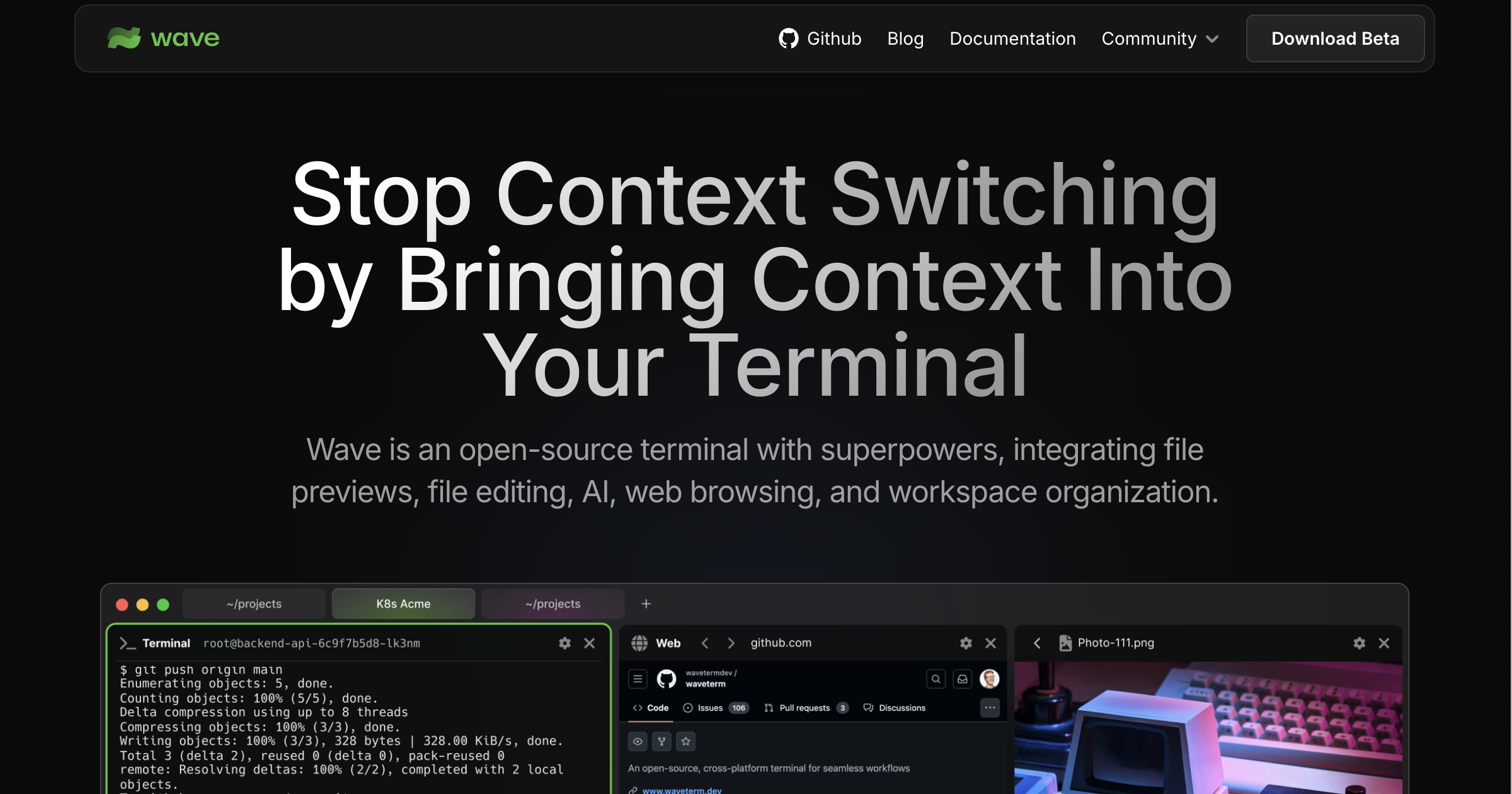
Wave Terminal is an open-source terminal designed to eliminate context switching by bringing all your tools into one place. It combines file previews, built-in editing, AI assistance, inline web browsing, and remote machine management into a single interface. - AI Integration: Built-in AI assistance for coding, debugging, and workspace management - Remote Machine Management: SSH connection manager with WSL support for quick server switching - Screen Splitting & Layouts: Customizable workspaces with split screens and dashboard layouts - Remote File Operations: Navigate, preview, and edit files on remote machines directly from the terminal - Inline File Preview: View images, markdown, audio/video, HTML, CSVs, and more without leaving the terminal - Built-in Editor: VSCode-like GUI editor with syntax highlighting, indentation, and copy/paste support - Customizable Dashboards: Build and share reusable widgets with HTML and data from the CLI - Cross-Platform: Available for macOS, Linux, and Windows - Local Data Storage: All data remains on your machine with no login or account required Wave Terminal is open-source and runs locally on your machine. It supports multiple installation methods including Snap, AppImage, .deb, .rpm, .zip, and pacman packages across different platforms. The application is designed to work offline with all features available without requiring cloud services.

Feature-rich terminal replacement for macOS
iTerm2 is a feature-rich terminal emulator for macOS, designed as a replacement for the built-in Terminal app. It brings modern functionality to the command line, making it more powerful and user-friendly for developers and power users. - Split Panes: Divide your terminal into multiple panes for multitasking. - Search & Autocomplete: Quickly find and reuse commands with powerful search tools. - Copy & Paste: Advanced clipboard management with history tracking. - Customizable UI: Themes, fonts, and colors to personalize your terminal. - Terminal Triggers: Automate actions based on specific text patterns. - Session Management: Save and restore terminal sessions for later use. - GPU Rendering: Smoother and faster rendering for complex displays. - tmux Integration: Seamless compatibility with tmux for advanced workflows. - Password Manager: Securely store and manage credentials within the terminal. - Broadcast Input: Send commands to multiple panes simultaneously. iTerm2 is a desktop application designed for macOS and does not require self-hosting. It is open-source software licensed under GPL v2, with the source code available on GitHub.

Open source observability platform for logs, traces and errors
HyperDX is an open source observability platform designed to help engineering teams resolve production issues faster. It unifies session replays, logs, traces, metrics, and errors into a single interface, eliminating the need for multiple tools. - End-to-End Tracing: Automatically trace requests from browser to backend servers and async workers - Blazing Fast Search: Search terabytes of events in seconds using ClickHouse - Intuitive Search Syntax: Simple full-text search without complex syntax requirements - Automatic Pattern Clustering: Aggregate log patterns and condense billions of events into distinctive clusters - Correlated Session Replays: Link session replays with backend logs and traces automatically - Visualization Tools: Build and share intuitive charts for logs, metrics, and traces - Automatic Instrumentation: Trace logs, API requests, DB queries with minimal code - Alerts & Notifications: Get notified via Slack, Email, or PagerDuty when issues occur - Intercom Integration: Jump directly from Intercom to user sessions and logs - Live Tail: View and search log streams in real-time - Native JSON Parsing: Search and graph structured JSON logs without configuration - Vendor Agnostic: Powered by OpenTelemetry for no vendor lock-in - Agent-Free Install: No additional agents, sidecars, or containers required HyperDX is built on ClickHouse and OpenTelemetry, making it highly scalable and compatible with various deployment environments. The platform offers both cloud-hosted and self-hosted options, with automatic instrumentation supporting multiple languages including Node.js, Python, Java, Go, Elixir, and React Native. Deployment is supported on Kubernetes, AWS EC2, Vercel, Fly.io, Heroku, and Cloudflare.
About Terminal
Terminal is Apple's built-in command-line interface for macOS, providing direct access to the operating system's underlying functions. This powerful tool enables users to execute commands, automate tasks, and manage system resources efficiently.
Key Features of Terminal
- Command Execution: Run shell commands directly for system management and automation
- Scripting Support: Execute shell scripts (Bash, Zsh, etc.) for advanced workflows
- System Monitoring: View and manage processes, files, and system resources
- Network Diagnostics: Test connectivity, ping servers, and troubleshoot network issues
- Developer Tools: Access Unix utilities and development environments natively
- Customization: Configure terminal appearance and behavior through preferences
- Integration: Works seamlessly with macOS system services and applications
Tech / Self-Hosting
Terminal is a native macOS application that comes pre-installed on all Mac computers. It does not require separate installation or hosting, as it operates locally on the user's device. The application is maintained and updated by Apple as part of the macOS operating system.