10 Best Open Source LM Studio Alternatives
A curated collection of the 10 best open source and self-hosted alternatives to LM Studio in 2026.
Looking for a free, privacy-friendly, or self-hosted replacement for LM Studio in 2026? The top open-source alternative is Ollama — Run open-source LLMs locally or in the cloud.
Other highly rated open-source LM Studio alternatives include llama.cpp, GPT4All and Cherry Studio.

Run open-source LLMs locally or in the cloud

Ollama is an open-source platform that simplifies running large language models (LLMs) locally or in the cloud while keeping your data private. It provides a seamless way to deploy frontier AI models with enterprise-grade performance and security. - Frontier Open Models: Access the latest open-source LLMs with performance comparable to closed alternatives at a fraction of the cost. - Local & Cloud Deployment: Run models locally for maximum privacy or deploy in the cloud across US, Europe, and Singapore for scalability. - High Performance: Dedicated infrastructure ensures reliable throughput even with multiple concurrent agents. - Easy Integration: Launch popular coding agents (Claude Code, Codex, OpenCode) with a single command and switch models without changing workflows. - Data Privacy: Prompts are never tracked or trained on by providers, ensuring complete data ownership. - Open Source: Fully open-source with open weights, allowing for transparency and customization. - Cross-Platform Support: Works seamlessly across macOS, Windows, Linux, and Docker. Ollama is open-source and can be self-hosted on any infrastructure. The platform supports Docker for easy deployment and provides comprehensive documentation for local and cloud setups. All cloud-hosted models are deployed in compliant regions (US, Europe, Singapore) to meet data residency requirements. View documentation | GitHub repository

Run frontier AI entirely on your machine
llama.cpp is an open-source framework designed to run large language models entirely on your local machine. It eliminates the need for API keys, telemetry, or external dependencies, ensuring complete privacy and control over your data. - Local AI Execution: Run frontier AI models entirely on your machine without relying on cloud services or API keys. - Privacy-First: No telemetry, no data collection, and no external dependencies—your conversations and models stay private. - Hardware Agnostic: Optimized for any hardware, from laptops to clusters, with the same binary and models across all platforms. - Hand-Tuned Kernels: Performance-optimized kernels for every GPU and CPU, including Apple Silicon, NVIDIA RTX, AMD Radeon, and Intel Arc. - Model Compatibility: Supports a wide range of models, including Qwen 3.8, Gemma 4, GPT-OSS, and Gemma 3. - Local Coding Agent Integration: Pair with local coding agents like Pi for agentic workflows without leaving your machine. - Easy Installation: Install via package managers (Brew, Winget) or build from source with detailed instructions. - No Limits: No usage restrictions, no rate limits, and no dependency on external services. llama.cpp is designed for self-hosting and can be deployed on any hardware, from consumer laptops to enterprise-grade clusters. It supports a variety of models and is optimized for performance across different architectures. The framework is open-source and can be self-hosted without any external dependencies.

Run open-source AI models locally on your device

GPT4All is a private, local AI chatbot that delivers high-performance open-source language models directly on your device. No cloud required—your data stays on your machine. - Local AI Execution: Run open-source models entirely offline on Windows, macOS, and Linux. - Customizable Models: Support for thousands of models with full customization options. - Local Document Chat: LocalDocs feature enables secure, private document interaction. - Developer-Friendly: Built for developers, teams, and AI power-users with maximum control and speed. - Cross-Platform: Available on macOS, Windows (including ARM), and Linux. - No Data Leakage: All processing happens locally—no data leaves your device. - Thousands of Models: Access a vast library of open-source models for various use cases. GPT4All is designed to run locally on your device, eliminating the need for cloud infrastructure. The software is open-source and can be self-hosted or deployed on-premise for enterprise use. It supports local model execution with no external dependencies, making it ideal for privacy-conscious users and organizations.

All-in-one AI desktop client for heavy users

Cherry Studio is a powerful, open-source AI desktop client designed for heavy AI users. It provides a unified interface to interact with frontier LLMs, AI agents, and creative tools—all while keeping your data local. - AI Chat: Engage in document, image, formula, and HTML conversations with AI - Autonomous Agents: Built-in 1000+ assistants for various tasks and workflows - AI Art & Drawing: Generate images using multiple AI models - AI Translation: Instant translation across conversations and documents - Multi-source Knowledge Base: Integrate local files, web pages, and other sources - Local & Cloud Backup: Secure data storage with flexible backup options - Cross-platform Support: Runs on Windows, macOS, and Linux - 300+ AI Models: Seamlessly switch between leading LLMs - Flagship Model Support: Early access to latest models like DeepSeek V4 Pro and GLM-5.3 Cherry Studio is open-source and can be self-hosted. All data is stored locally by default, ensuring privacy and control. The application supports integration with multiple AI providers and offers enterprise solutions for teams requiring additional features and support.

Run any AI model locally on any hardware
LocalAI is an open-source AI engine designed to make AI accessible on any hardware, from laptops to GPU clusters. It provides a unified runtime for running text, voice, vision, image, video, 3D, and agent-based models locally, eliminating the need for cloud-based AI services. - Multi-Modal Support: Run text, voice, vision, images, video, 3D, and agents from a single runtime. - Hardware Agnostic: Works on CPUs, GPUs (CUDA, ROCm, Metal, Vulkan), and ARM64 without requiring specialized hardware. - OpenAI-Compatible API: Seamlessly integrates with existing clients using OpenAI, Anthropic, Ollama, or ElevenLabs APIs. - Dynamic Engine Switching: Swap between backends (llama.cpp, vLLM, MLX, etc.) with a single line in the model's config. - Realtime Capabilities: Enable real-time voice interactions, transcription, and speech synthesis over WebRTC without a GPU. - Distributed AI: Scale across multiple machines with smart routing, VRAM-aware placement, and failover support. - Privacy-First: All processing happens locally; no data leaves your machine. - 1,255+ Pre-Configured Models: One-click installation for a wide range of models. - 19 Custom Engines: Built from scratch for specific tasks like real-time voice, vision, and 3D reconstruction. - Agent & MCP Support: Run autonomous agents, RAG, and interactive tools locally. - Self-Hosted: Fully self-hostable on any hardware, including edge devices. - Open Source: MIT-licensed, available on GitHub. - Cross-Platform: Supports x8664, ARM64, and various GPU frameworks (CUDA, ROCm, Metal, Vulkan). - Scalable: From a single laptop to a distributed cluster of machines. - Documentation: Comprehensive docs for setup, configuration, and advanced use cases.
Jan runs open-source AI models on your own hardware or connects to cloud providers like OpenAI, Anthropic, and Google, keeping your conversations off third-party servers.
Jan runs open-source AI models on your own hardware or connects to cloud providers like OpenAI, Anthropic, and Google, keeping your conversations off third-party servers.

Open-source desktop AI assistant with MCP support

5ire is a sleek, cross-platform desktop AI assistant and MCP (Model Context Protocol) client designed for simplicity and user-friendliness. It provides an intuitive interface for interacting with large language models while offering advanced features like local knowledge bases, custom prompt libraries, and usage analytics. - MCP Support: Standardized connection to AI models via MCP servers, enabling access to tools like file systems, databases, and remote data sources. - Local Knowledge Base: Integrates the bge-m3 embedding model for multilingual vectorization, supporting document parsing (DOCX, XLSX, PPTX, PDF, TXT, CSV) and local RAG capabilities. - Usage Analytics: Tracks API usage and spending to help users optimize their AI service consumption. - Prompts Library: Create and organize custom prompts with variable support for versatile use cases. - Bookmarks: Save and retain conversations even after original messages are deleted. - Global Search: Perform keyword searches across all conversations for quick information retrieval. 5ire is an open-source project available for Mac (Silicon/Intel), Windows, and Linux. It can also be installed via Homebrew on macOS. The project is licensed under Apache 2.0 and encourages community contributions.

Chat with private local LLMs offline

Fullmoon is a lightweight app designed to bring the power of large language models to your Apple devices. Whether you're using an iPhone, iPad, Mac, or Vision Pro, Fullmoon provides a seamless way to interact with LLMs without compromising your privacy. - Private & Local: Runs models entirely on-device with no cloud dependency, ensuring your data never leaves your device. - Offline Capability: Works fully offline when internet is unavailable, perfect for travel or areas with poor connectivity. - Apple Silicon Optimized: Leverages Metal 3 and Swift MLX for maximum performance on Apple hardware. - Model Variety: Supports multiple quantized models including Llama 3.2 (1B/3B) and DeepSeek R1 variants. - Customization: Personalize themes, fonts, and system prompts to tailor the experience to your preferences. - Shortcuts Integration: Use local models with Apple Shortcuts for automation and workflow integration. - TestFlight Access: Get early access to new features and models through TestFlight. Fullmoon is currently available as an iOS/iPadOS/macOS app with no self-hosting option. The app is open source (GitHub repository) and runs exclusively on Apple devices with Apple Silicon processors. Models are quantized for efficient on-device inference.

Open chat interface for all your AI models
Zola is a self-hosted chat interface designed to provide a unified experience for interacting with multiple AI models. Built with privacy and developer experience in mind, it allows users to connect and manage various AI models from a single dashboard. - Unified AI Model Interface: Connect and interact with multiple AI models in one place. - Self-Hosted: Full control over your data with self-hosting capabilities. - Privacy-Focused: No telemetry or tracking, ensuring your conversations remain private. - Open Source: Transparent and customizable codebase. - Multi-Model Support: Compatible with various AI models and providers. - Developer-Friendly: Built with modern web technologies for easy integration and extension. - Customizable UI: Tailor the interface to your preferences. Zola is built with Next.js and TypeScript, making it easy to deploy on platforms like Vercel, Netlify, or any Node.js-compatible server. The project includes a Dockerfile for containerized deployments, simplifying the setup process. Configuration is managed via environment variables, allowing for flexible customization.

Private AI assistant running entirely on your device
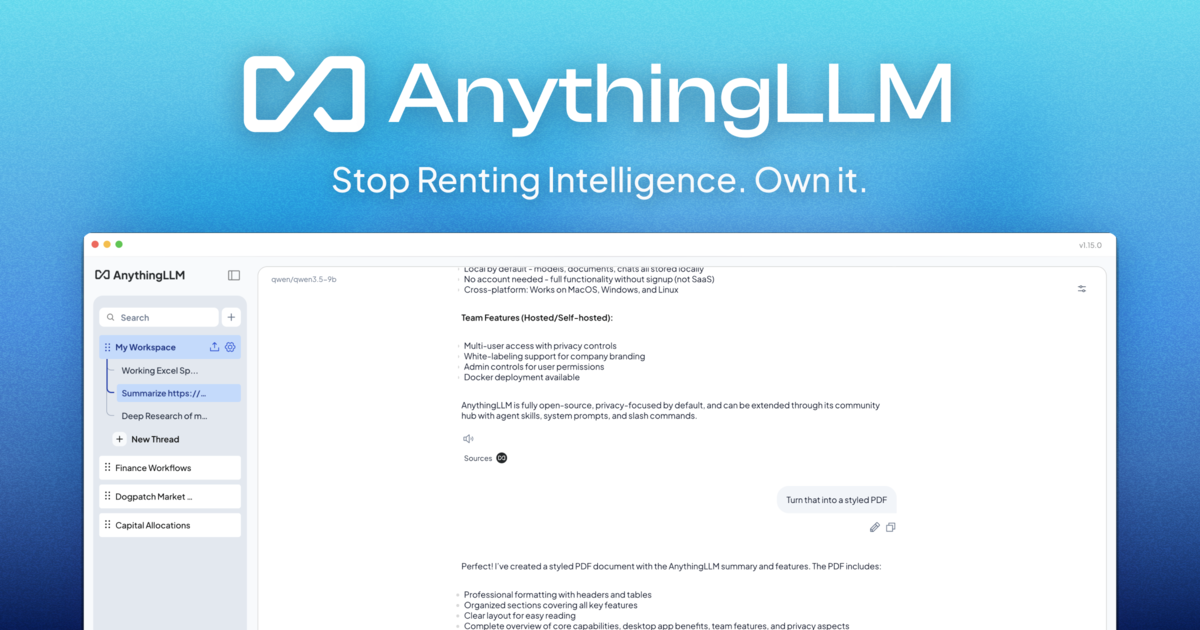
A private AI assistant that runs entirely on your computer. No accounts, no API keys, no token limits. - On-device AI: Runs entirely locally with no cloud processing or data leaving your device - Document Knowledge: Every document becomes part of your agent's knowledge base - Meeting Assistant: Automatically transcribes and summarizes meetings with action items and key decisions - Background Jobs: Automate recurring tasks and workflows - Dynamic Model Selection: Choose or auto-select the best model for your hardware - Web Scraping & Search: Access real-time information from the web - Custom Agent Skills: Build and deploy custom AI capabilities - Magic Features: Includes intelligent dictation, real-time text refinement, and context-aware autocomplete - Cross-platform: Available for macOS, Windows, and Linux - Easy Setup: One-file installation with no dependencies - Docker Support: Available for containerized deployment - Open Source: Full source code available on GitHub - Self-hosted Options: Cloud and mobile versions available for team collaboration
About LM Studio
Discover, download, and run large language models locally on your Mac, Windows, or Linux machine without writing any code. LM Studio gives you a chat interface for talking to models, a local server that mimics the OpenAI API so your existing apps work without changes, and a model library that pulls directly from Hugging Face. It's built for people who want to experiment with AI models privately, without sending data to external services.